Oakville and Milton Humane Society
Oakville and Milton Humane Society
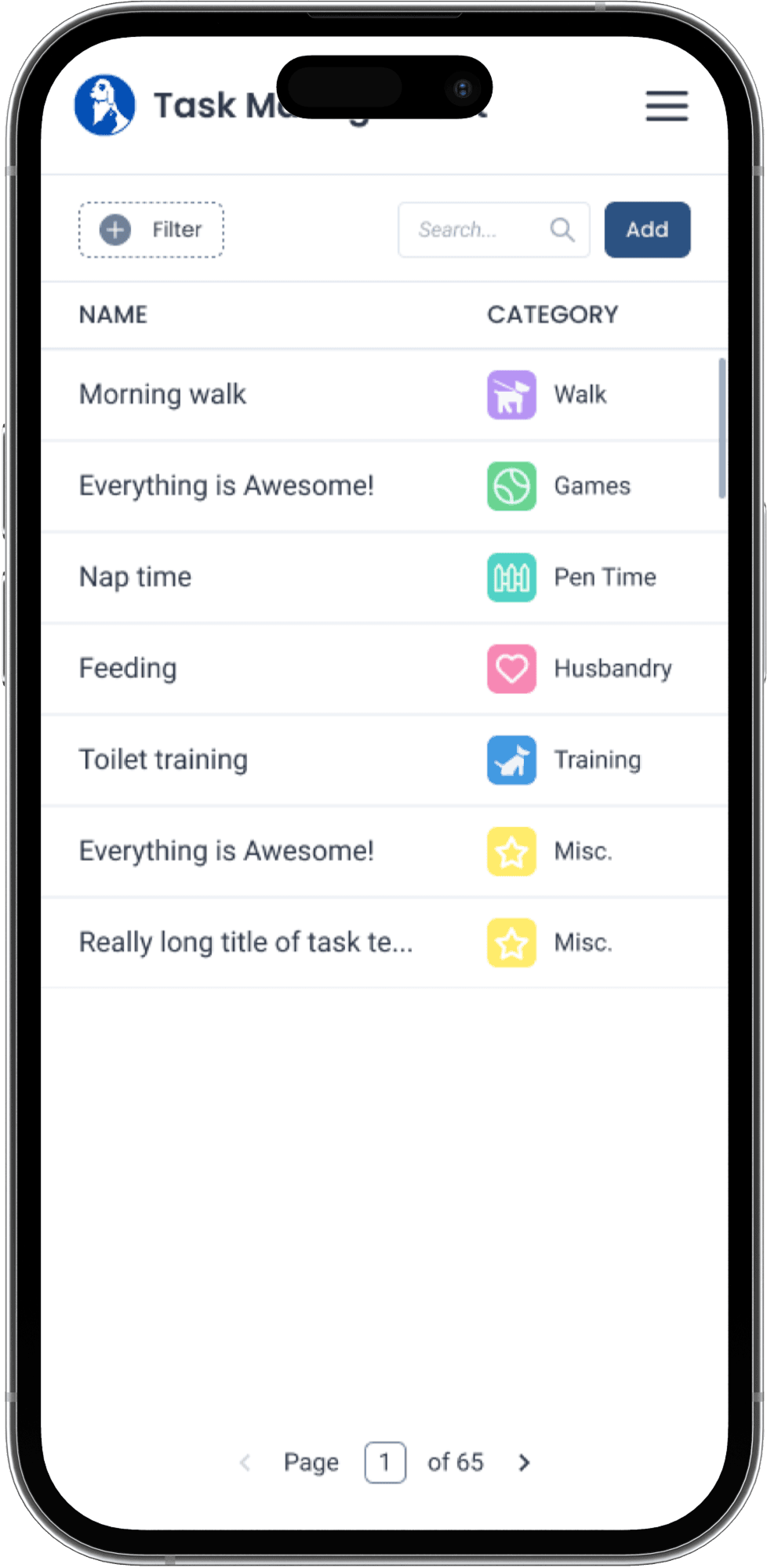
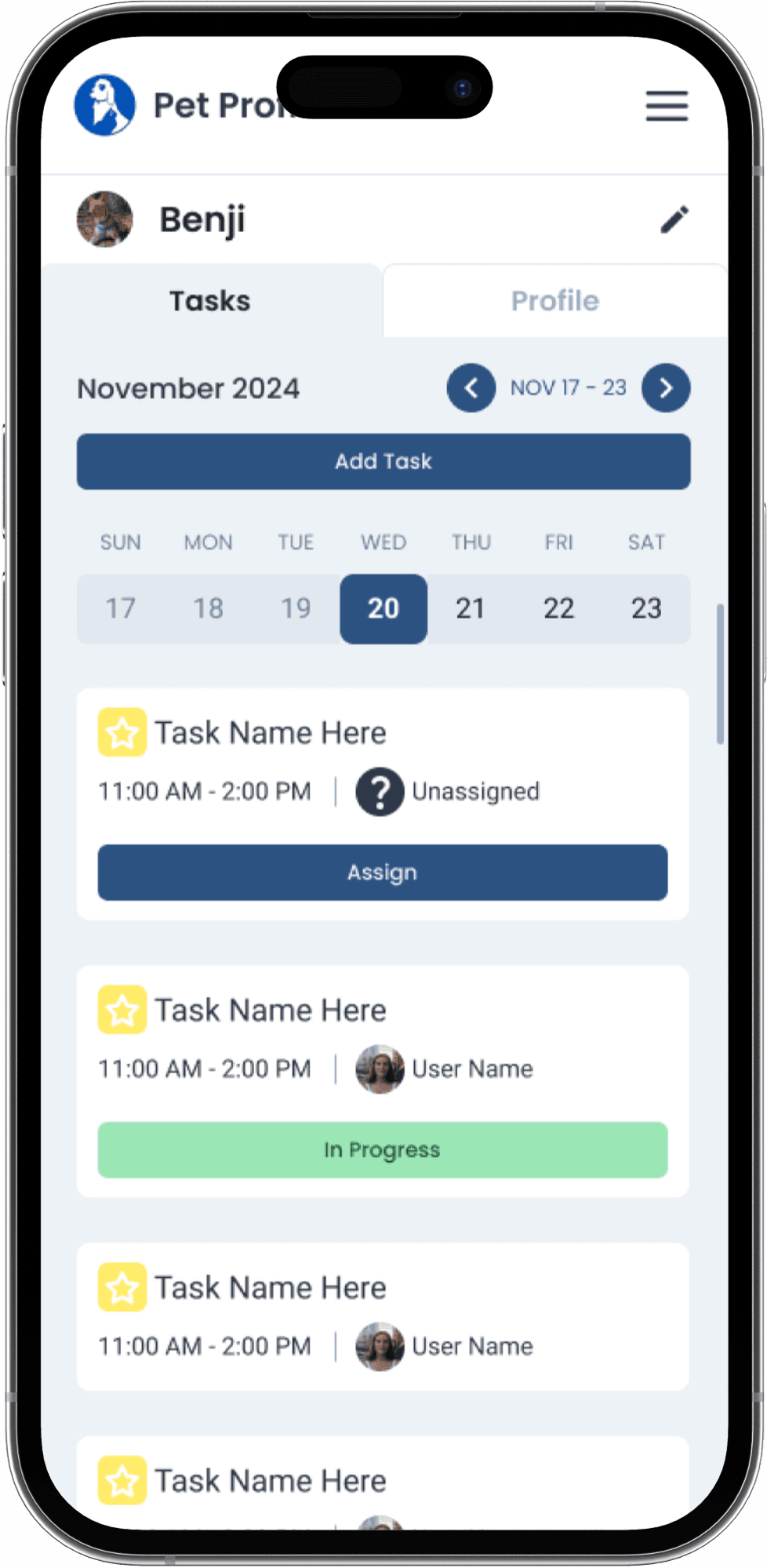
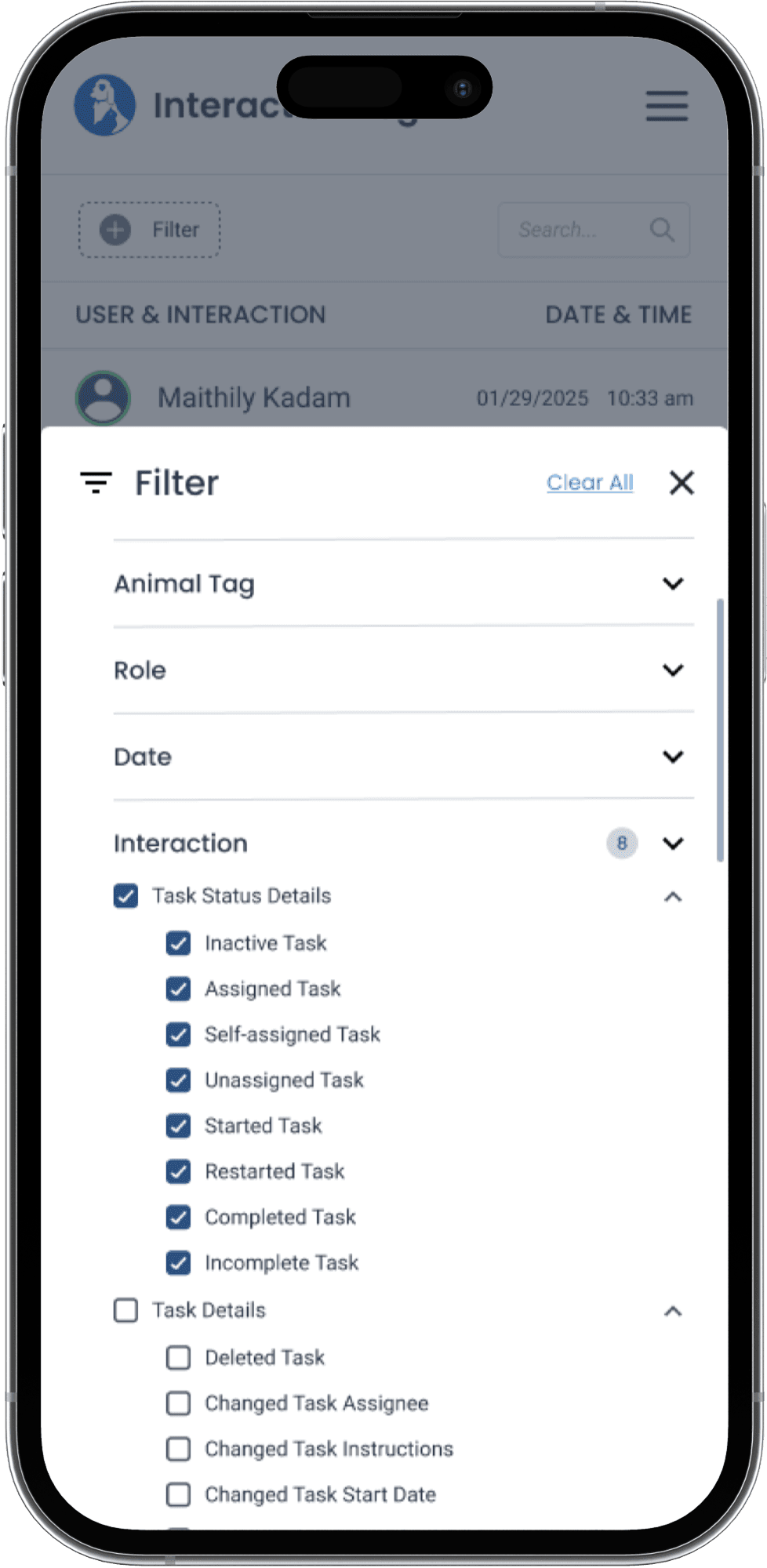
ROLE:
UX DESIGNER
ROLE:
UX DESIGNER
TIMELINE:
8 WEEKS
TIMELINE:
8 WEEKS
TOOLS:
FIGMA, FIGJAM
TEAM:
4 DESIGNERS
6 DEVELOPERS
2 PMS
TEAM:
4 DESIGNERS
6 DEVELOPERS
2 PMS
TOOLS:
FIGMA,FIGJAM
Redesigning shelter operations through clarity and care
Redesigning shelter operations through clarity and care
How can we make animal, volunteer, and record management intuitive and stress-free for everyone?
How can we make animal, volunteer, and record management intuitive and stress-free for everyone?
TL;DR
WHAT WAS BROKEN
WHAT WAS BROKEN
WHAT WE CHANGED
WHAT WE CHANGED
WHY IT MATTERED
WHY IT MATTERED
Daily shelter operations relied on fragmented tools, manual updates, and tribal knowledge, creating stress and inconsistencies in animal care.
Daily shelter operations relied on fragmented tools, manual updates, and tribal knowledge, creating stress and inconsistencies in animal care.
We designed a centralized, mobile-first system that organizes tasks, records, and schedules around how staff and volunteers actually work.
We designed a centralized, mobile-first system that organizes tasks, records, and schedules around how staff and volunteers actually work.
Clear ownership, faster access to information, and calmer workflows, allowing teams to focus on care, not coordination.
Clear ownership, faster access to information, and calmer workflows, allowing teams to focus on care, not coordination.
35%
Reduction in task coordination time
2x
Faster access to animal records
40%
Fewer missed or duplicated tasks
Impact based on stakeholder feedback, usability testing insights, and workflow analysis.
40%
Fewer missed or duplicated tasks
2x
Faster access to animal records
35%
Reduction in task coordination time
TL;DR
Impact based on stakeholder feedback, usability testing insights, and workflow analysis.
Oakville & Milton Humane Society supports animal care, adoption, and volunteer coordination across their shelter. Daily operations depend on staff and volunteers managing animal records, schedules, and care tasks in fast-paced, emotionally demanding environments.
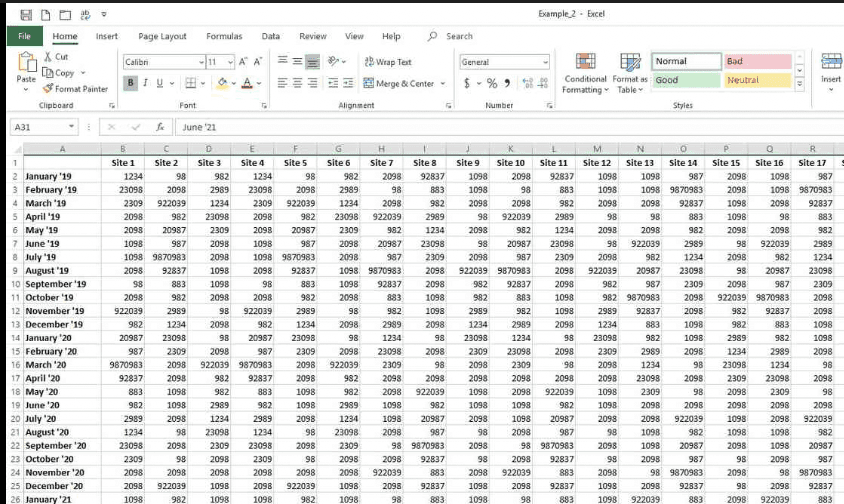
This is all done on a Microsoft Excel spreadsheet, shared across staff and volunteers during live animal care.
Track animal status, medical notes, and behavioural changes across the day
Assign daily tasks
Coordinate volunteers across shifts
Record pet updates in real time
Track animal status, medical notes, and behavioural changes across the day
Assign daily tasks
Coordinate volunteers across shifts
Record pet updates in real time
Common Problems
Common Problems
Reality in the Humane Society
Reality in the Humane Society
High cognitive load
Staff had to scan dense, multi-column data while multitasking, increasing mental strain during already high-stress moments.Easy to overwrite or miss information
Critical notes were buried, duplicated, or accidentally erased, leading to inconsistent care and follow-ups.Not mobile-friendly
Updates often happened after tasks were completed, creating gaps between care and documentation.
Daily Tasks
Daily Tasks
Oakville & Milton Humane Society supports animal care, adoption, and volunteer coordination across their shelter. Daily operations depend on staff and volunteers managing animal records, schedules, and care tasks in fast-paced, emotionally demanding environments.
All done on a Microsoft Excel spreadsheet, shared across staff and volunteers during live animal care.
High cognitive load
Staff had to scan dense, multi-column data while multitasking, increasing mental strain during already high-stress moments.Easy to overwrite or miss information
Critical notes were buried, duplicated, or accidentally erased, leading to inconsistent care and follow-ups.Not mobile-friendly
Updates often happened after tasks were completed, creating gaps between care and documentation.
Before designing solutions, we needed to deeply understand how staff and volunteers currently worked, where friction existed, and what success actually looked like for them.
Before designing solutions, we needed to deeply understand how staff and volunteers currently worked, where friction existed, and what success actually looked like for them.
Methods Used
Methods Used
Stakeholder Interviews
Stakeholder Interviews
Listening Before Designing
Listening Before Designing
Information was overcrowded, forcing staff to scroll and cross-reference constantly.
Data entry relied on manual consistency, leading to frequent errors and outdated records.
The spreadsheet required prior knowledge, making onboarding new volunteers difficult.
No visual hierarchy made urgent tasks hard to identify quickly.
Information was overcrowded, forcing staff to scroll and cross-reference constantly.
Data entry relied on manual consistency, leading to frequent errors and outdated records.
The spreadsheet required prior knowledge, making onboarding new volunteers difficult.
No visual hierarchy made urgent tasks hard to identify quickly.
Existing Sytem Audit (Excel)
Existing Sytem Audit (Excel)
Workflow Walkthroughs
Workflow Walkthroughs
Affinity Mapping
Affinity Mapping
Why Excel Failed
Why Excel Failed
Key Insights
How This Shaped Our Design
Separated information by purpose
Animals, tasks, schedules, and notes live in distinct views instead of one dense system.
What We Didn't Do
Staff needed clarity at a glance, not more data fields.
The system had to support varying levels of technical comfort.
Information structure mattered more than feature depth.
Reducing cognitive load was essential for day-to-day efficiency.
Staff needed clarity at a glance, not more data fields.
The system had to support varying levels of technical comfort.
Information structure mattered more than feature depth.
Reducing cognitive load was essential for day-to-day efficiency.
We intentionally avoided over-automation and complex workflows, prioritizing simplicity over speed based on research findings.
Designed for zero-training use
Navigation and interactions were optimized for rotating volunteers and first-time users.
Reduced visual and cognitive load
We prioritized spacing, hierarchy, and clarity over feature density.
Understanding Our Users
Understanding Our Users
Phillip, Age 57, Volunteer
Long-time animal volunteer, low tech confidence, rotating shifts
Goals
Complete assigned tasks correctly and on time
Quickly understand what each animal needs
Avoid asking staff for clarification
Pain Points
Dense tools are hard to navigate
Instructions are unclear or buried
Fear of making mistakes in records
Design Implications
Zero-training onboarding
Clear task ownership and step-by-step guidance
Large tap targets, readable layouts, minimal clutter
Emily, Age 25, Shelter Staff
Manages animal care, volunteers, and records
Goals
Know task status at a glance
Ensure animals receive consistent care
Reduce time spent coordinating volunteers
Pain Points
Overlapping responsibilities and interruptions
Missed or duplicated tasks
Manual follow-ups with volunteers
Design Implications
Real-time task visibility
Centralized records per animal
Clear accountability and handoffs
Key Insights
Key Insights
Phillip, Age 57, Volunteer
Long-time animal volunteer, low tech confidence, rotating shifts
Goals
Complete assigned tasks correctly and on time
Quickly understand what each animal needs
Avoid asking staff for clarification
Pain Points
Dense tools are hard to navigate
Instructions are unclear or buried
Fear of making mistakes in records
Design Implications
Zero-training onboarding
Clear task ownership and step-by-step guidance
Large tap targets, readable layouts, minimal clutter
Emily, Age 25, Shelter Staff
Manages animal care, volunteers, and records
Goals
Know task status at a glance
Ensure animals receive consistent care
Reduce time spent coordinating volunteers
Pain Points
Overlapping responsibilities and interruptions
Missed or duplicated tasks
Manual follow-ups with volunteers
Design Implications
Real-time task visibility
Centralized records per animal
Clear accountability and handoffs
With multiple users, tasks, and records in play, the system needed clear structure before visual design. We focused on defining how information should be grouped, accessed, and updated in real time.
With multiple users, tasks, and records in play, the system needed clear structure before visual design. We focused on defining how information should be grouped, accessed, and updated in real time.
Structuring the Experience
Structuring the Experience
Before
Before
Everything lived in a single Excel sheet. Animals, tasks, volunteers, notes, all creating clutter, errors, and missed information.
Everything lived in a single Excel sheet. Animals, tasks, volunteers, notes, all creating clutter, errors, and missed information.
After
After
We separated information by purpose, so staff could find what they needed at the moment they needed it.
We separated information by purpose, so staff could find what they needed at the moment they needed it.
The Goal
The Goal
Turn one overloaded spreadsheet into a system that reflects how shelters actually operate.
Turn one overloaded spreadsheet into a system that reflects how shelters actually operate.
Core Structure
Core Structure
Animals → profiles, medical notes, care history
Tasks → daily responsibilities tied to animals and shifts
Volunteers → roles, schedules, assignments
Animals → profiles, medical notes, care history
Tasks → daily responsibilities tied to animals and shifts
Volunteers → roles, schedules, assignments
With the information architecture defined, we moved quickly into low-fidelity wireframes to test how the system would actually feel in use. The goal wasn’t visual polish, it was validating flows, hierarchy, and task clarity before committing to UI decisions.
These wireframes helped us pressure-test whether staff and volunteers could:
Find critical information at a glance
Understand task ownership without explanation
Move through daily workflows with minimal friction
With the information architecture defined, we moved quickly into low-fidelity wireframes to test how the system would actually feel in use. The goal wasn’t visual polish, it was validating flows, hierarchy, and task clarity before committing to UI decisions.
These wireframes helped us pressure-test whether staff and volunteers could:
Find critical information at a glance
Understand task ownership without explanation
Move through daily workflows with minimal friction
From Structure to Interaction
From Structure to Interaction
Low-Fidelity Wireframes
Low-Fidelity Wireframes
These wireframes focused on core shelter workflows; tracking animals, managing volunteers, and accessing records quickly—prioritizing clarity and ease of use for all experience levels.
These wireframes focused on core shelter workflows; tracking animals, managing volunteers, and accessing records quickly—prioritizing clarity and ease of use for all experience levels.
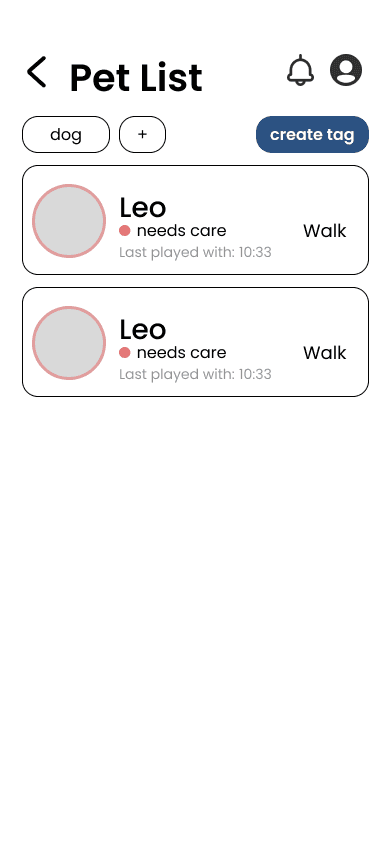
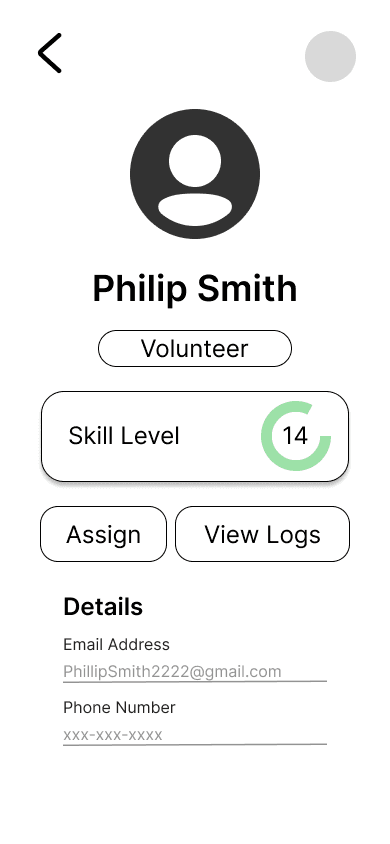
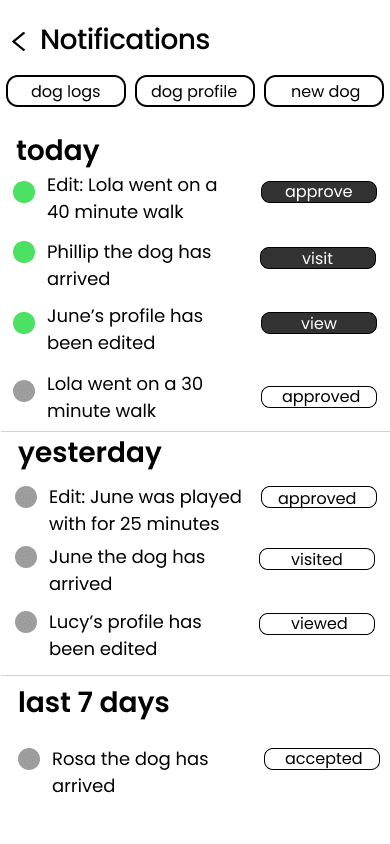
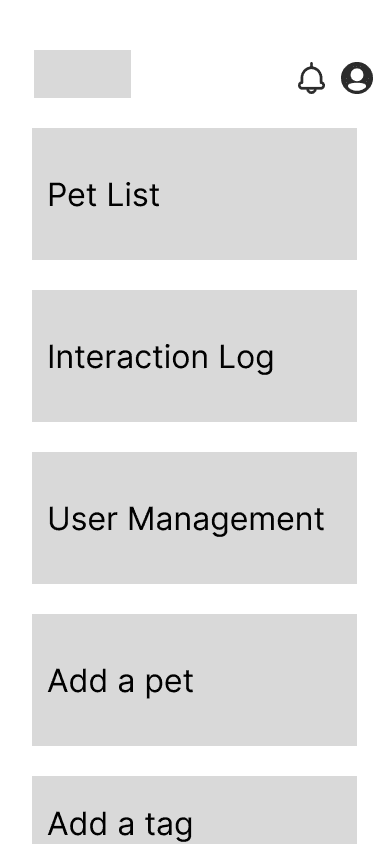
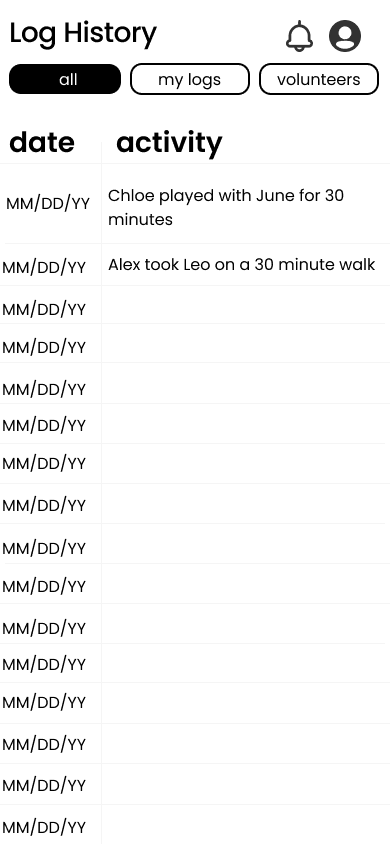
Partnered closely with developers and stakeholders throughout the design process, using low-fidelity wireframes to align early on feasibility, constraints, and implementation details
Led regular design walkthroughs and feedback sessions to maintain shared understanding across teams and ensure user flows and interactions were clearly communicated
Incorporated cross-functional feedback iteratively, balancing user needs with technical and operational realities to support a smooth handoff into development
Collaboration + Cross-Functional Work
Collaboration + Cross-Functional Work
The low-fidelity wireframes helped align design, product, and development early by clearly communicating the design vision and enabling feasibility discussions before high-fidelity execution.
The low-fidelity wireframes helped align design, product, and development early by clearly communicating the design vision and enabling feasibility discussions before high-fidelity execution.
Early wireframe reviews with developers revealed unnecessary navigation complexity, which I simplified while preserving core user tasks to support smoother development.
Early wireframe reviews with developers revealed unnecessary navigation complexity, which I simplified while preserving core user tasks to support smoother development.
This experience reinforced the importance of frequent design check-ins and early feedback from the full team. By sharing work early and often, we were able to iterate efficiently, stay aligned, and avoid costly rework later in the process.
This experience reinforced the importance of frequent design check-ins and early feedback from the full team. By sharing work early and often, we were able to iterate efficiently, stay aligned, and avoid costly rework later in the process.
Guided by our research insights, we translated clarity, accessibility, and efficiency into a cohesive visual system and final product.
Guided by our research insights, we translated clarity, accessibility, and efficiency into a cohesive visual system and final product.
Design Direction
Design Direction
Clarity First
Clarity First
Layouts prioritize scannability, clear hierarchy, and reduced cognitive load for fast-paced shelter environments.
Layouts prioritize scannability, clear hierarchy, and reduced cognitive load for fast-paced shelter environments.
Designed for All Users
Designed for All Users
Interfaces accommodate varying levels of tech familiarity, ensuring staff and volunteers feel confident using the system.
Interfaces accommodate varying levels of tech familiarity, ensuring staff and volunteers feel confident using the system.
Calm & Trustworthy Visuals
Calm & Trustworthy Visuals
A neutral, friendly color palette and restrained typography reinforce care, professionalism, and reliability.
A neutral, friendly color palette and restrained typography reinforce care, professionalism, and reliability.
Design Pillars
Design Pillars
High Fidelity Screens
High Fidelity Screens
These principles guided the final interface across key workflows.
These principles guided the final interface across key workflows.
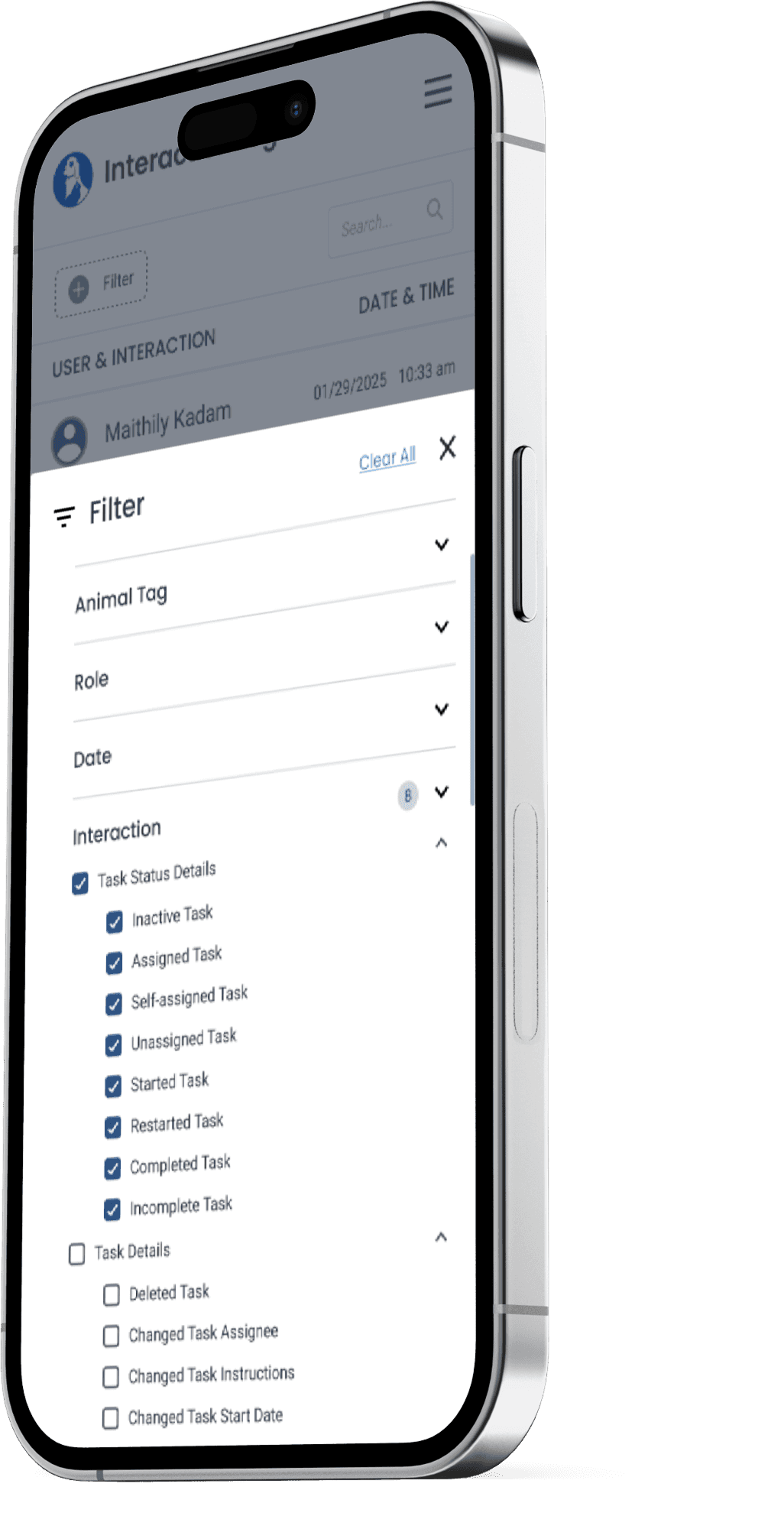
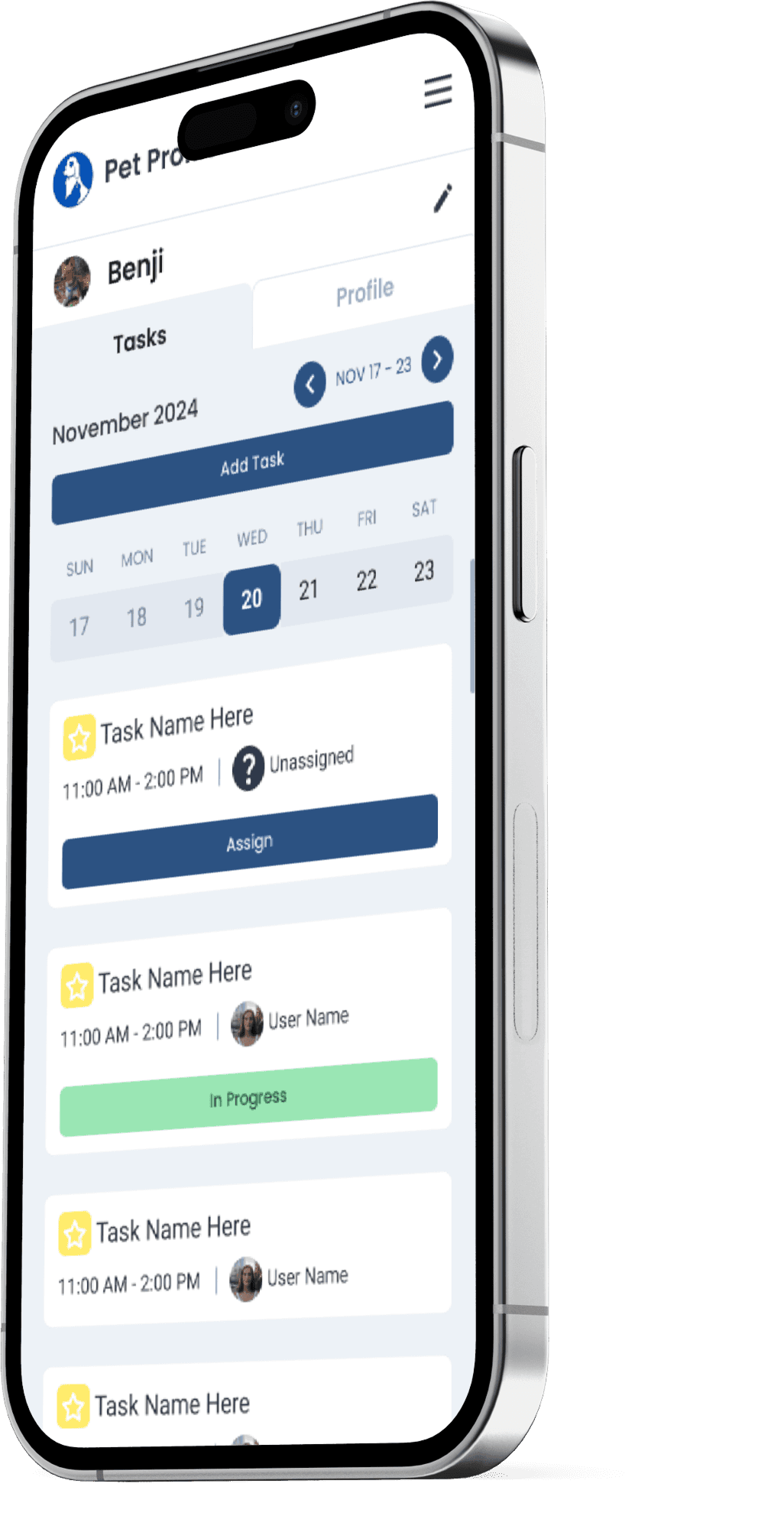
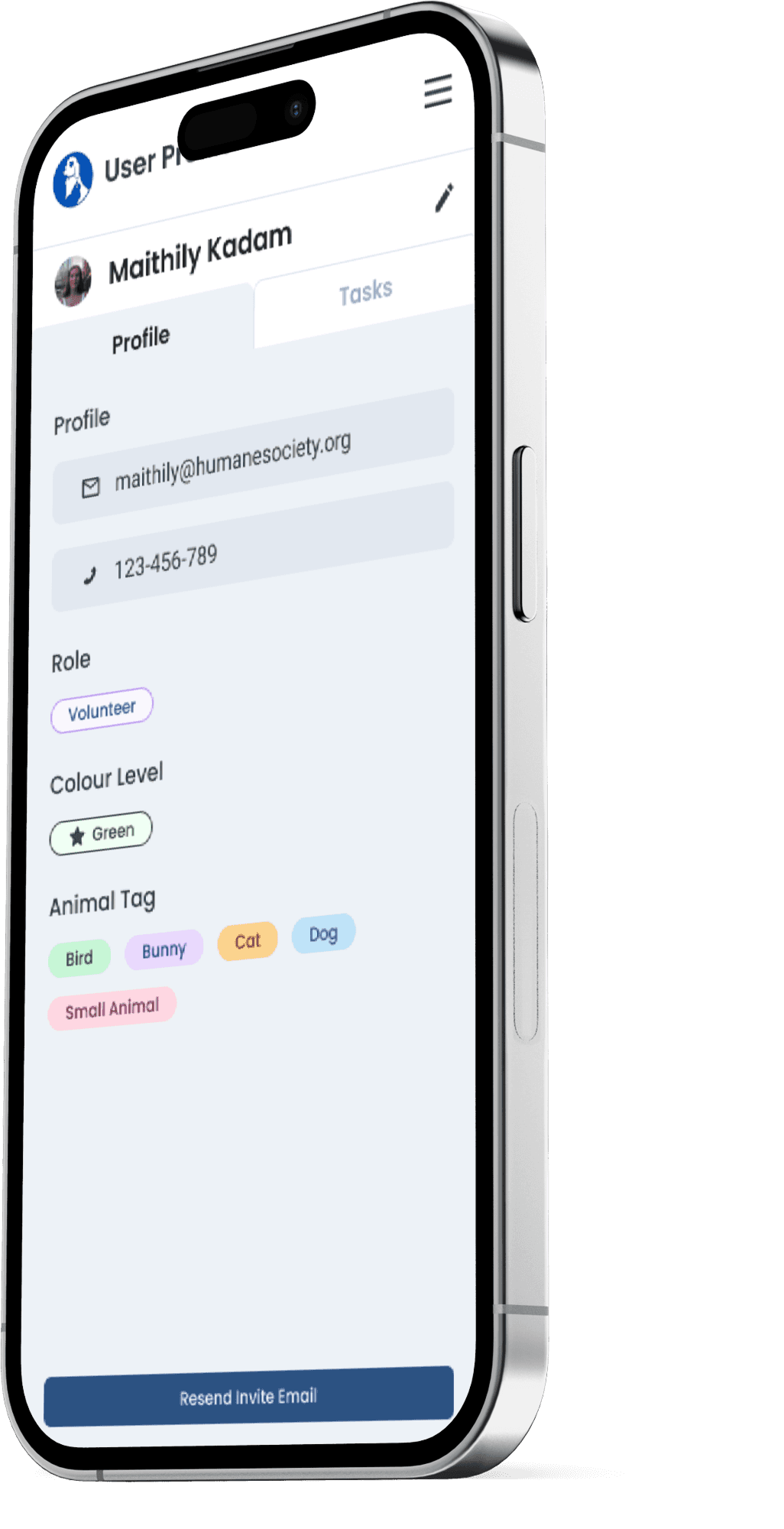
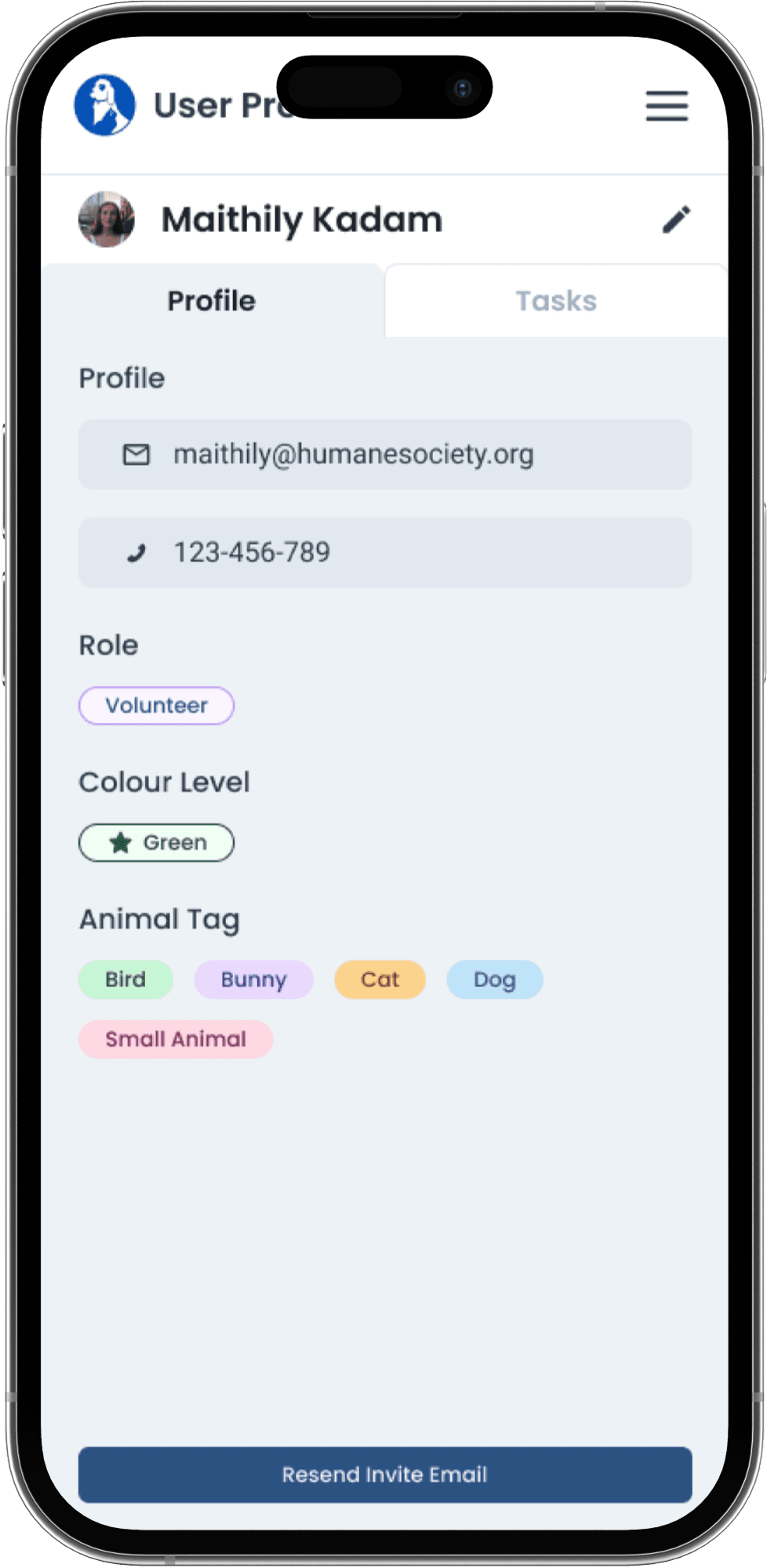
These high-fidelity screens reflect a system designed for clarity under pressure, balancing structure, warmth, and ease of use across complex shelter workflows.
These high-fidelity screens reflect a system designed for clarity under pressure, balancing structure, warmth, and ease of use across complex shelter workflows.
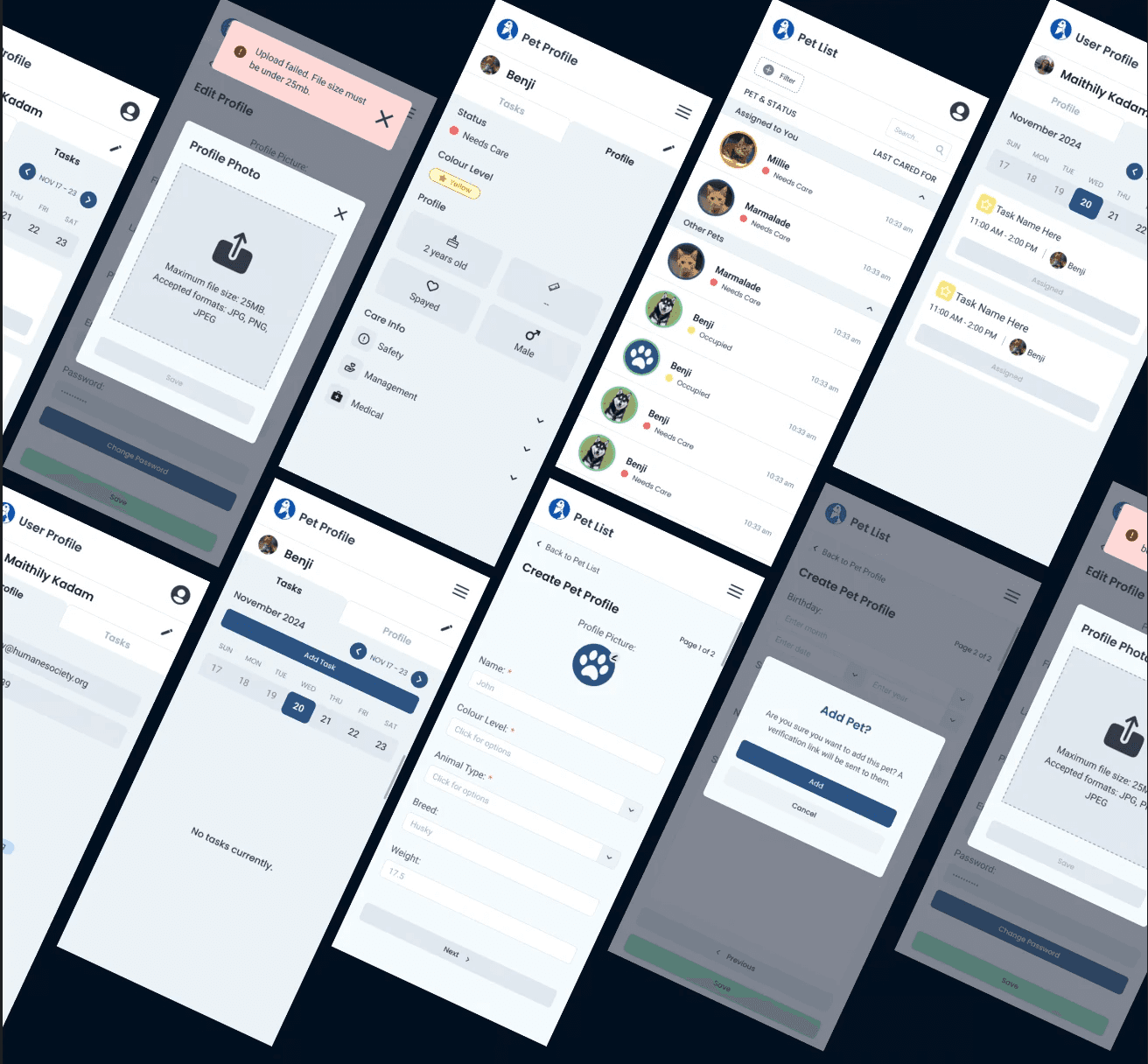
To ensure consistency, accessibility, and scalability, we created a design system that supported both staff and volunteers across the platform.
To ensure consistency, accessibility, and scalability, we created a design system that supported both staff and volunteers across the platform.
Design System
Design System
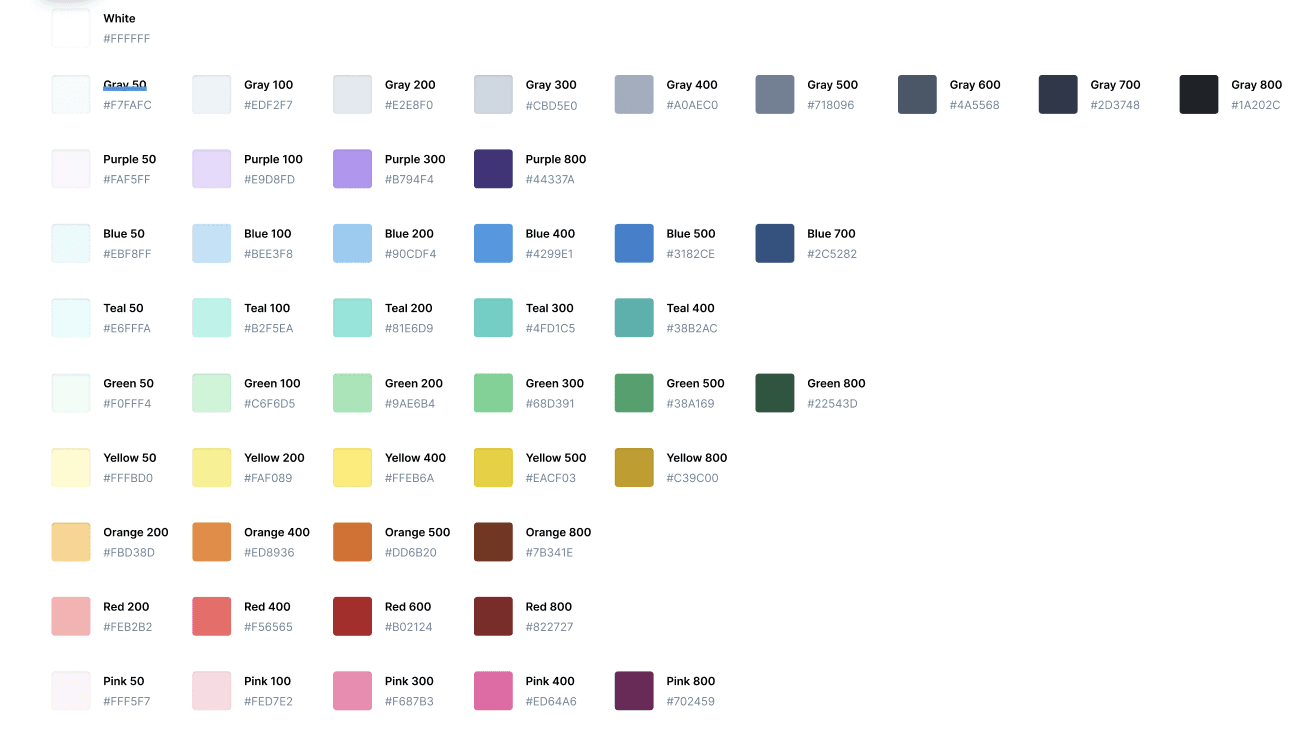
Colours
Colours
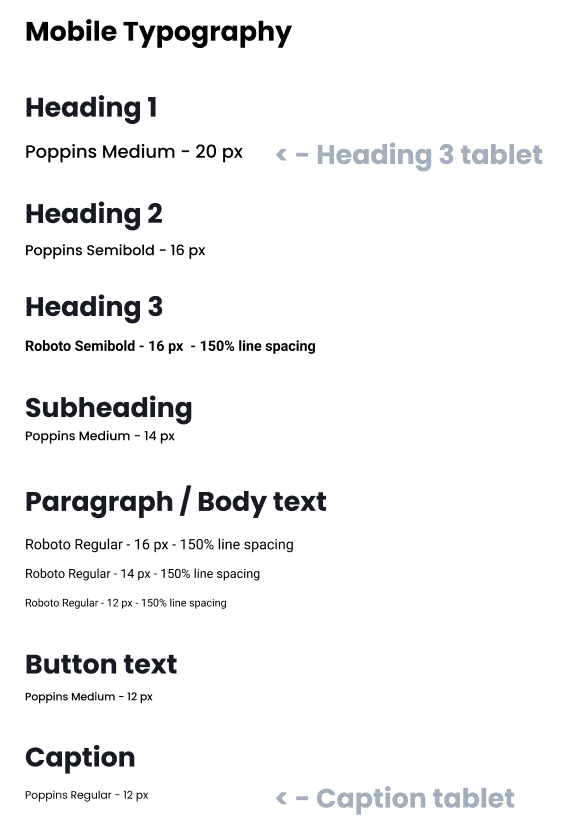
Typography
Typography
Components
Components
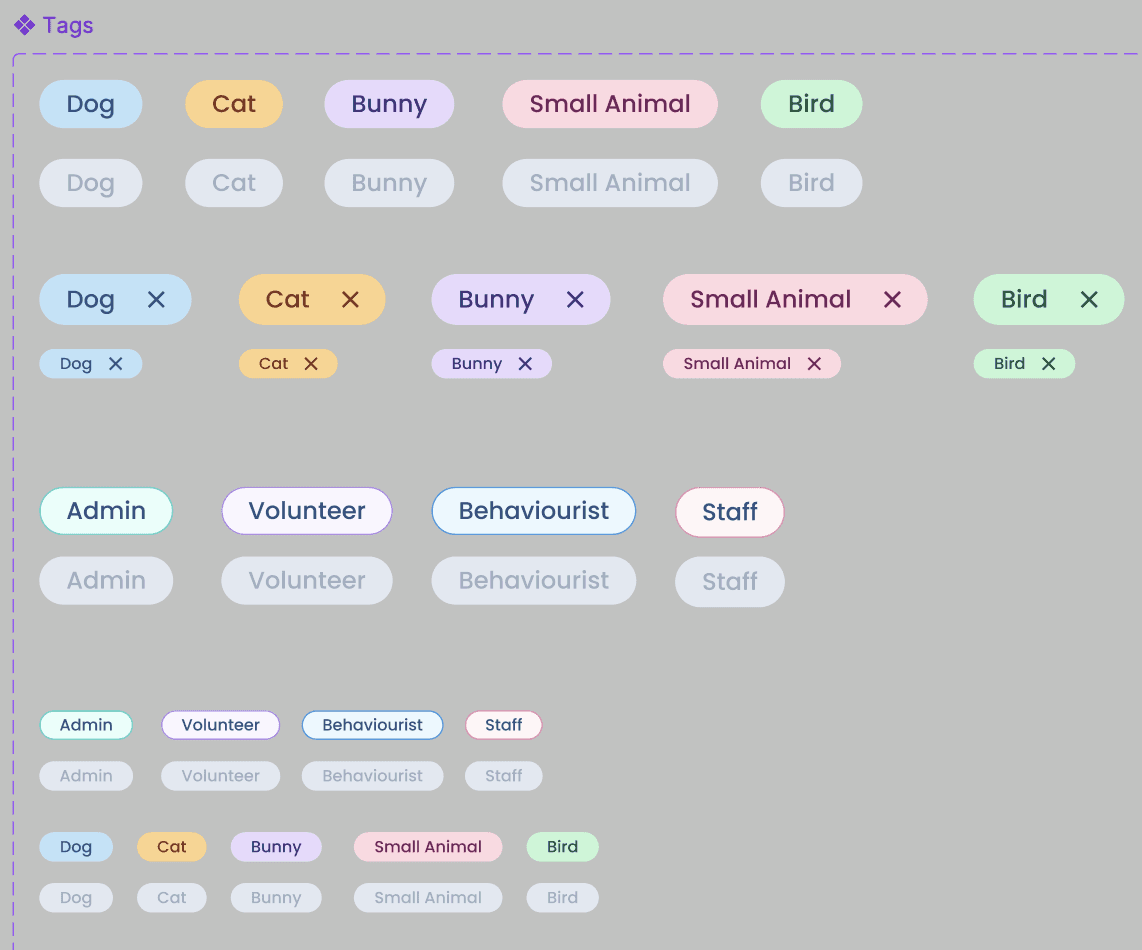
Components: Designed for reuse across multiple workflows
Components: Designed for reuse across multiple workflows
Color: Chosen to feel calm, trustworthy, and aligned with the humane society’s mission
Color: Chosen to feel calm, trustworthy, and aligned with the humane society’s mission
Typography: Prioritized clarity and readability for quick scanning
Typography: Prioritized clarity and readability for quick scanning
A look at the impact of the solution and the design decisions behind it, plus what I’d take forward.
Results & Impact
Staff could spend less time searching and updating information
Volunteers experienced clearer expectations and smoother onboarding
The humane society gained a scalable foundation for future growth
Results
After the redesign, we improved the following:
Centralized workflows replaced a single, error-prone Excel sheet, making information easier to find and manage.
Reduced cognitive load for staff and volunteers through clearer navigation, hierarchy, and labeling.
More consistent processes across teams, improving confidence and day-to-day efficiency.
Impact
Reflection
What I Learned
Designing for non-technical users reinforced the importance of clarity over complexity.
Early research and stakeholder conversations were critical in shaping realistic, usable solutions.
Strong information architecture directly impacts trust, efficiency, and confidence in a system.
What I'd Improve Next
Conduct usability testing with a broader range of volunteers over longer periods.
Explore lightweight automation or reporting features as a future iteration.
Refine accessibility further as real usage data becomes available.
This project strengthened my ability to design systems that balance empathy, clarity, and real-world constraints, especially in mission-driven environments.
<— PREVIOUS
Home
NEXT —>
Orbit Case Study
A look at the impact of the solution and the design decisions behind it, plus what I’d take forward.
Results & Impact
Staff could spend less time searching and updating information
Volunteers experienced clearer expectations and smoother onboarding
The humane society gained a scalable foundation for future growth
Results
After the redesign, we improved the following:
Centralized workflows replaced a single, error-prone Excel sheet, making information easier to find and manage.
Reduced cognitive load for staff and volunteers through clearer navigation, hierarchy, and labeling.
More consistent processes across teams, improving confidence and day-to-day efficiency.
Impact
A look at the impact of the solution and the design decisions behind it, plus what I’d take forward.
Reflection
What I Learned
Designing for non-technical users reinforced the importance of clarity over complexity.
Early research and stakeholder conversations were critical in shaping realistic, usable solutions.
Strong information architecture directly impacts trust, efficiency, and confidence in a system.
What I'd Improve Next
Conduct usability testing with a broader range of volunteers over longer periods.
Explore lightweight automation or reporting features as a future iteration.
Refine accessibility further as real usage data becomes available.
<— PREVIOUS
Home
This project strengthened my ability to design systems that balance empathy, clarity, and real-world constraints, especially in mission-driven environments.
NEXT —>
Orbit Case Study
What We Didn't Do
How This Shaped Our Design
Separated information by purpose
Animals, tasks, schedules, and notes live in distinct views instead of one dense system.
Designed for zero-training use
Navigation and interactions were optimized for rotating volunteers and first-time users.
Reduced visual and cognitive load
We prioritized spacing, hierarchy, and clarity over feature density.
We intentionally avoided over-automation and complex workflows, prioritizing simplicity over speed based on research findings.
Let's turn ideas into impact
Come say hi! I'd love to chat :)


Let's turn ideas into impact
Come say hi! I'd love to chat :)